Let your phone provide the context.
Install Fewer Apps from Google Play. Grant Usage Access in Android Settings and return to the app. Fewer Apps uses this permission to read usage and app-size information on your device.
Fewer Apps for Android
See recorded usage and estimated app sizes. Choose what you no longer need, then confirm each uninstall with Android. Review and removal are free.
No account, ads, or subscription. Optional one-time History unlock.

How to find and remove unused Android apps
The game you stopped playing. The app from one trip. Start with the records your phone can provide, then make the call yourself.
Install Fewer Apps from Google Play. Grant Usage Access in Android Settings and return to the app. Fewer Apps uses this permission to read usage and app-size information on your device.
Review apps you can open, grouped by recorded use. See estimated sizes and last-opened dates where available. Android’s usage history can be incomplete; missing usage records are shown as unknown.
Review removal suggestions, then confirm each uninstall in Android’s system dialog. System apps stay out of the removal list. Nothing is removed automatically.
A usage record helps you decide; it cannot tell you whether an app matters to you. App sizes are estimates reported before removal, not a measurement of free space gained.
In the app
The Review screen brings recorded usage, estimated app sizes, and available last-opened dates together. Missing dates are labelled, so you can see what Android knows before making a choice.
Open the full-size Review screen ↗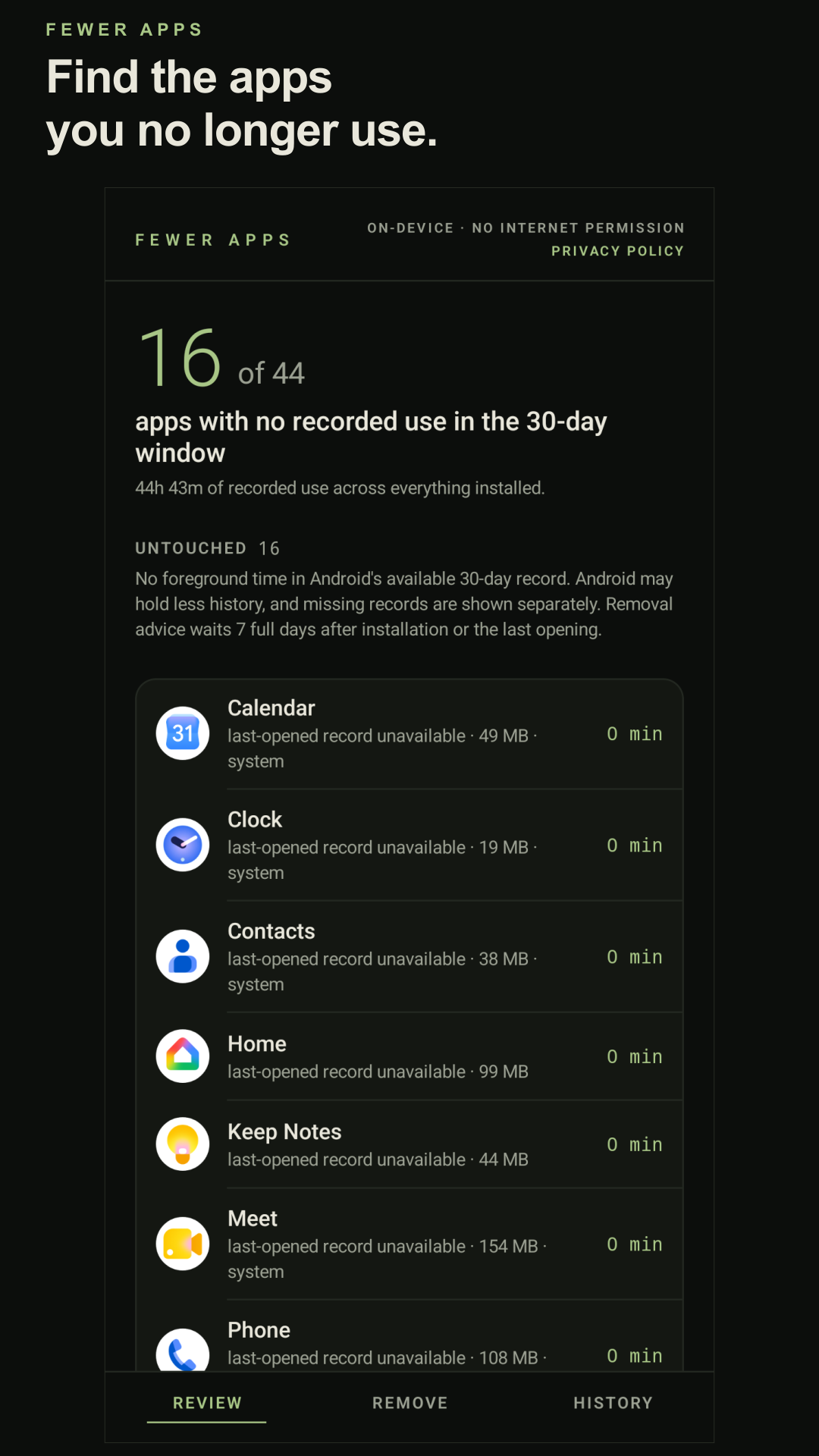
Start with the useful part
You can make your first cleanup decision without buying anything. History is there if you want to look back at the removals you make through Fewer Apps.
Free
Optional one-time unlock
See the apps you remove through Fewer Apps, their removal dates, and recorded app sizes. Look back at your progress without a subscription.
History does not sync or move to another phone. Clearing Fewer Apps’ data or uninstalling it erases its entries. Restoring the purchase unlocks History again, but does not recover deleted entries.
Google Play shows your local price before purchase.
Before you start
No. The available records vary. When Android provides no usage record for an app, Fewer Apps marks its usage as unknown and withholds removal advice for that app. No recorded use is a clue to review, not proof that you never need the app.
Fewer Apps reviews apps you can launch. System apps can appear in the review, but are excluded from removal suggestions. Android controls which apps can be uninstalled and asks you to confirm each removal.
Fewer Apps does not back up apps or their data. Check anything you need to keep before confirming an uninstall. Its optional History records removals; it does not restore removed apps or their data.
Fewer Apps has no internet permission, app account, ads, or app analytics. Your usage records and History stay on your device. Google Play handles purchases. Read the privacy policy.
Find the apps you still use. Make your own call about the rest.